Merge Up Blast
FRUIT MERGING MEETS ARCADE PRESSURE.
A new take on the classic: sped up with bombs, a hold slot, and a ticking drop timer.
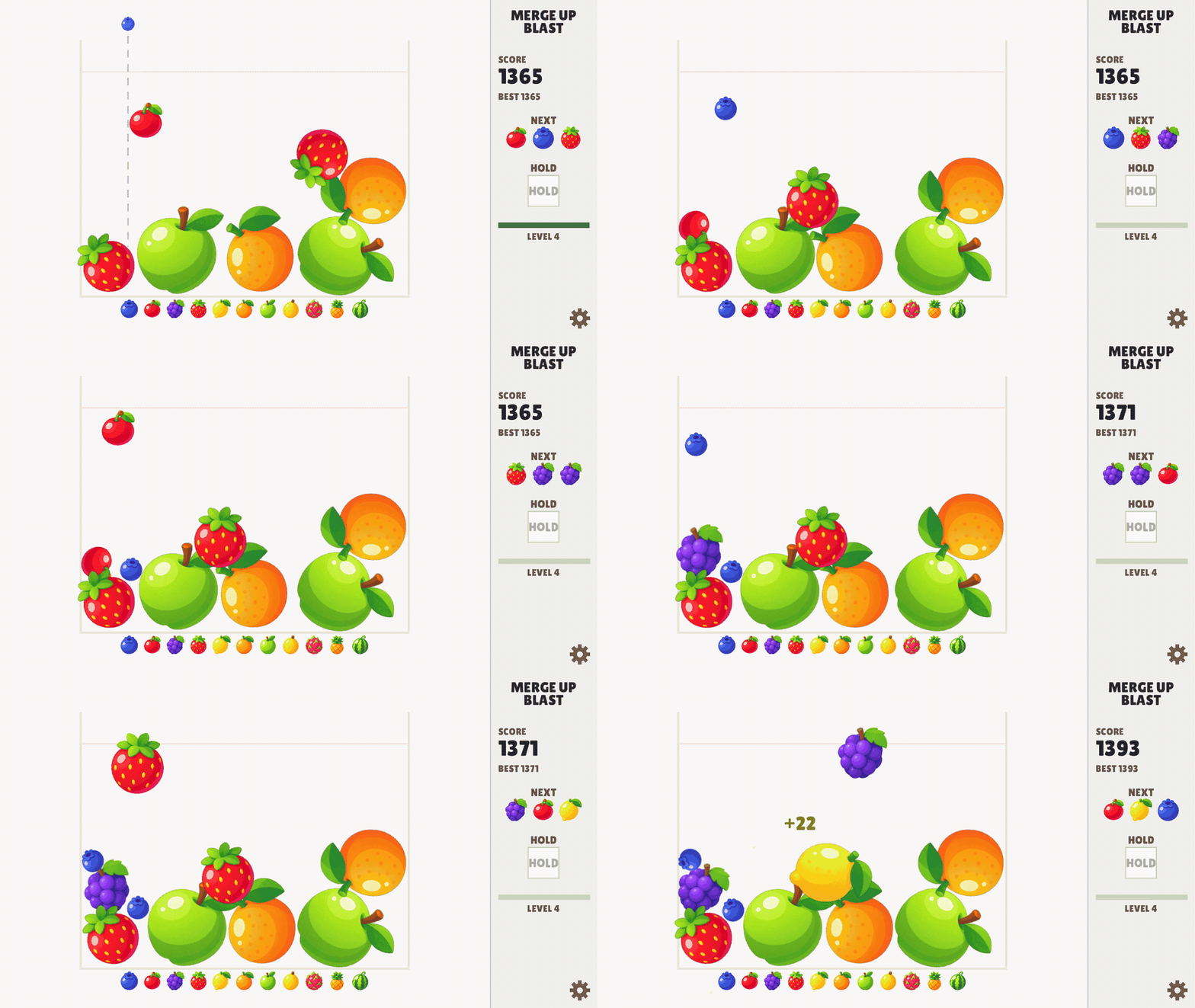
Drop fruit into the jar. Match two of the same to merge into the next tier. Keep the pile under control while the timer gets shorter. Earn combos to beat your high score.
Try the free demo above or download a version for your handheld, computer, or Android device below.
Features
- Make room with a bang. Bombs count down 3–2–1, then blast small fruit out of the jar.
- Keep something in reserve. Hold a fruit or swap it out once per drop, with the next three fruit always in view.
- Beat the clock. Eight levels tighten the drop timer from 5 seconds to 3. Take too long and the fruit drops for you.
- Merge Combos. Build combos up to ×9 and earn multiples on your points.
- Quicksave: pick up where you left off
- Dark Mode: keep merging after dark.
- Beat the high score: an arcade-style top-five high-score table.
Work your way through 11 fruit tiers. Can you reach the top of the ladder?

Made for handhelds.
Merge Up Blast started on the TrimUI Brick Pro. On the NextUI build, full button controls, responsive rumble, and LEDs support.
A133P packages target Brick, Brick Pro, Brick Hammer, and Smart Pro, with downloads for NextUI, Knulli, Spruce, stock/CrossMix, and a manual PortMaster layout. Compatibility across every device and firmware combination is still being tested. Download the Demo and test on your device before purchasing.
Also available for Windows, Mac, Linux, and Android, with a demo you can play in your browser.
Controls
| Handheld | D-pad or left stick aims · A drops · B holds · MENU pauses · Start + Select saves and exits |
|---|---|
| Computer | Mouse or arrows aim · Click or Space drops · Tab holds · P or Escape pauses · M mutes · F11 toggles fullscreen |
| Android | Drag to aim · Lift to drop · Tap the hold box to hold or swap |
Installing
Choose the download for your platform and firmware. The same steps apply to the demo; use the files with Demo in their names.
TrimUI handhelds
The handheld packages are for the A133P-based Brick, Brick Pro, Brick Hammer, and Smart Pro. Additional firmware builds are experimental; please test the demo on your setup before purchasing.
- NextUI: Unzip and copy
Merge Up Blast.pakintoTools/tg5040/on your SD card. Open it from Tools. The demo folder isMerge Up Blast Demo.pak. - Knulli: Merge the included
romsfolder into the root of your SHARE partition. The launcher and game folder go in/userdata/roms/ports/. Refresh game lists and open the game from Ports. - Spruce: Merge the included
Romsfolder into your SD-card root. Refresh the game list and open it from Ports. Older installations usingRoms/PORTSshould receive the launcher and game folder there instead. - Stock / CrossMix: Merge the included
Appsfolder into your SD-card root. Open Merge Up Blast from Apps. - Other compatible firmware using PortMaster: Copy the
.shlauncher andmergeupblastfolder together into your existing Ports directory, then refresh the game list. The demo usesmergeupblast-demo. This is a manual installation, not a PortMaster catalogue listing.
Mac
Unzip and move Merge Up Blast.app into Applications. The app is unsigned. If macOS blocks it, first try opening it, then go to System Settings → Privacy & Security → Open Anyway and confirm.
Windows
Extract the entire ZIP. Keep the assets folder beside Merge Up Blast.exe and double-click the executable. If SmartScreen shows “Windows protected your PC,” choose More info → Run anyway.
Linux
Extract the entire ZIP and keep the executable beside its assets folder. In that directory, run:
chmod +x "Merge Up Blast"
./"Merge Up Blast"
For the demo, use "Merge Up Blast Demo". Requires x86-64 Linux with glibc 2.35 or newer, such as Ubuntu 22.04 or later.
Android
Open the APK. If prompted, go to Settings → Allow from this source for your browser or file manager, then return and tap Install. The demo and full game install separately.
Purchase
In order to download this game you must purchase it at or above the minimum price of $3.99 USD. You will get access to the following files:
Download demo
Development log
- R36s darkosre builds now available1 day ago

Leave a comment
Log in with itch.io to leave a comment.